Mealime closes on October 21.
Find your recipes by name and keep them.
Mealime has announced that its app shuts down on October 21, 2026, and that account data, including your saved favourites, will then be deleted. There is no export. In Misa you find your favourites by name among 2,601 Mealime recipes saved by the Internet Archive, tick them and import them together. Then Misa plans a week from them, picking dinners that share ingredients, and you shop from one list. Free, without an account.
Import my Mealime recipesWhat moves: recipes with a public page or a saved copy, up to 200 on one device. What doesn’t: your meal plans, grocery lists, favourites list and settings. For 599 of the 2,601 recipes you can pick 2, 4 or 6 servings before importing; the rest keep the source’s servings and units.
How we tested the import (20 of 20 from the archive)
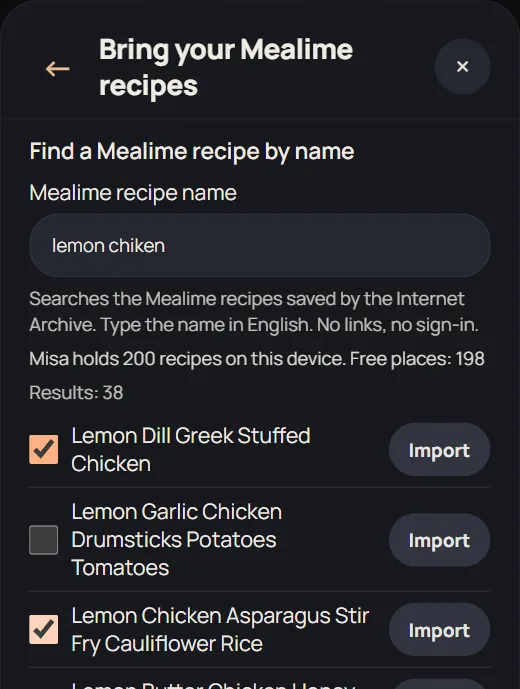
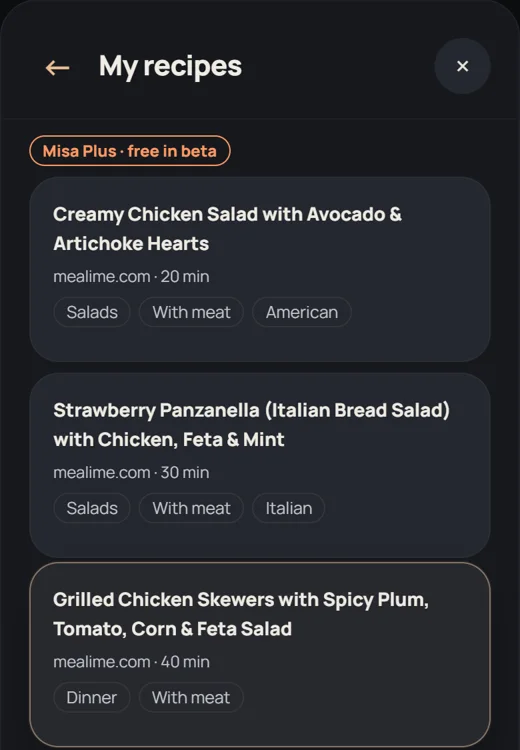
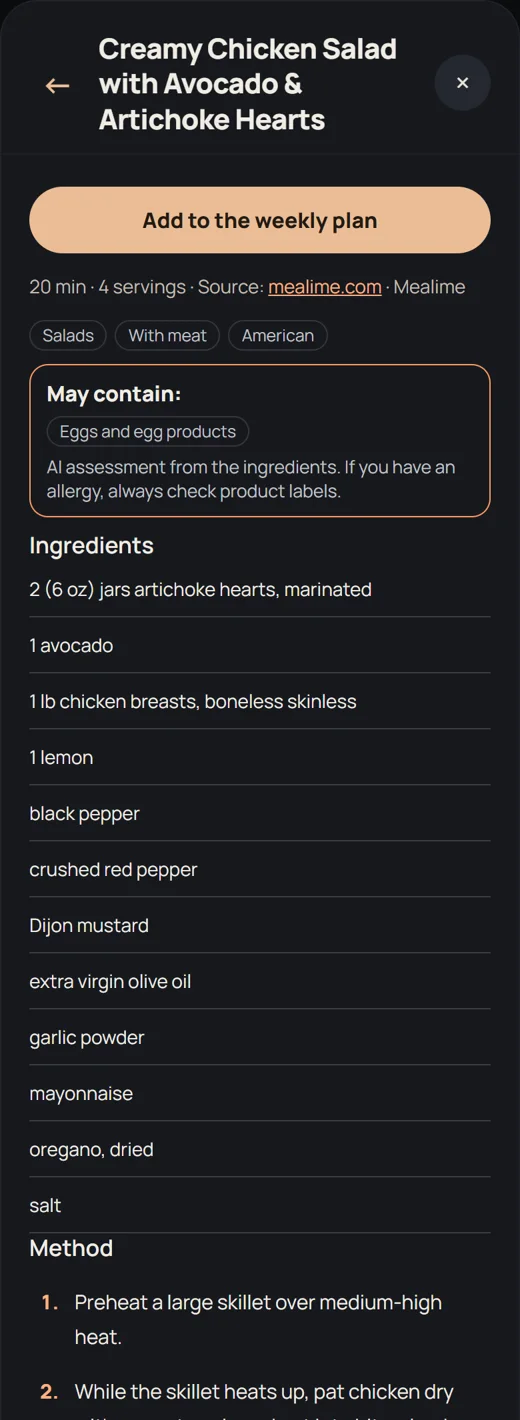
Our test on September 30, 2026, in Microsoft Edge on Windows: 3 of 3 Mealime recipes imported with every ingredient (12 to 15 lines), every step (7 to 14), servings, time and a link back to the source (1, 2, 3). A small desktop sample, not a guarantee for every page or phone. If Mealime takes a page down, Misa reads the Internet Archive’s saved copy instead: on October 15, 2026 the archive held copies saved in 2026 of 2,601 Mealime recipes, and the same 3 recipes imported from those copies with every ingredient and step. In a second test that day, 20 of 20 randomly chosen Mealime recipes imported from their archive copies with every ingredient and step.
Before you start: how to save your Mealime recipes, whichever app you choose (links, PDF copies, import).
Misa is an independent app. It is not affiliated with, endorsed by or connected to Mealime or Albertsons.
- STEP 1
Find your favourites by name
Tap “Import my Mealime recipes” and type a recipe name as you remember it, for example “lemon chicken”; typos are fine. Misa searches the 2,601 Mealime recipes saved by the Internet Archive. Tick each favourite, up to 50 at a time; Misa shows how many of its 200 places are left. Not in the list? Paste its mealime.com/recipes link, or a link from another recipe site, in the box under the search.
- STEP 2
Import them in one go
Tap “Import selected”. Misa saves the recipes one by one in the background, so you can close the window and keep using the app. Recipes that fail are listed by name with the reason and a “Try again” button.
- STEP 3
Plan a week that shares ingredients
Tap “Plan a week from these recipes”. Misa picks dinners that use the same ingredients, shows how many items you’ll buy compared with shopping for each dinner separately, and puts them on your free days. The shopping list adds up shared amounts (2 and 3 cloves of garlic become one row of 5) and is sorted by aisle. Any recipe can also go on a day from the calendar.
- STEP 4
Keep a backup
Your recipes live in this browser and don’t sync on their own. When the import finishes, Misa offers a backup file: download it, or save it to Google Drive, OneDrive or iCloud Drive. To move to another phone or browser, open Misa there and choose the file under “Restore from file”.
Two ways forward
Stay with Mealime’s recipe collection: Mealime says its recipes continue in Meals Hub, inside the apps and websites of Albertsons Companies stores (such as Safeway and Albertsons) in the US. You sign in with an Albertsons Companies store account; Mealime says it works for recipes, plans and lists even without shopping there. Your Mealime account data is still deleted. We haven’t checked whether Meals Hub works outside the US. Mealime’s notice.
Keep the recipes you cook in your own planner: import them into Misa as above, together with the rest of your week.
Mealime and Misa side by side
| Mealime | Misa | |
|---|---|---|
| Price | Free until it closes on Oct 21 | Free, including importing your Mealime recipes |
| Account | Needed | Not needed. Your data stays in your browser |
| Your account and favourites | Deleted at shutdown, no export (recipes move to Meals Hub by Albertsons) | Stored in your browser; download a backup any time |
| Import from other sites | Yes, one link at a time | Yes, from sites with readable recipe data; several links at once |
| Mealime recipes after Oct 21 | Moving to Meals Hub | Find by name and import, from the Internet Archive copy when the page is gone |
| Weekly plan and shopping list | Yes | Yes: a week from your recipes that share ingredients, shared amounts added up, list grouped by aisle |
| Nutrition | A Pro feature, free for everyone until the shutdown | Free for Misa recipes; an estimate for imported ones when possible |
| Phone app | iOS and Android | Runs in the browser; add it to your home screen. No store app yet |
| Where you shop | Meals Hub, the successor, lives in Albertsons Companies store apps and websites, with a store account | Any store: the shopping list is yours to check off or copy |
Mealime facts from mealime.com/closing and Mealime’s help pages, checked on September 30, 2026.
Honest answers
Should I do this before October 21? Yes. Your favourites list disappears with your account, and Mealime hasn’t said whether its recipe pages stay online after the shutdown. If a page does go offline later, Misa tries the Internet Archive’s saved copy, but not every recipe has one.
Can Misa bring over my meal plans, grocery lists or settings? No. Mealime has no export, so only recipes with a public page can be moved. To rebuild your week in Misa, open Meal plan, tap a day and pick a dinner, or let Misa suggest a week for your household.
What about recipes I had imported into Mealime from other sites? Import them into Misa from the original site’s page in the same way; Misa reads most recipe sites.
Does Misa have Mealime’s recipes built in? No. Misa has its own recipes and more than 3,400 openly licensed ones. Recipes you import stay private on your device for your own cooking; Misa shows where each came from, but that doesn’t give anyone the right to republish them.
Is there an app in the App Store or Google Play? Not yet. Misa works in the browser on any phone and can be added to your home screen.
Can I change the servings or units? For 599 Mealime recipes the archive has a 2, 4 and 6 serving version, and you pick one before importing. Other imported recipes keep the amounts and servings of the source page. Misa’s own recipes scale to your household and switch between metric and US units.
Where are my recipes stored? In your browser on this device, and they work offline. Clearing your browser’s site data deletes them, so keep a backup: after an import Misa offers a backup file you can download or save to Google Drive, OneDrive or iCloud Drive, and My profile → Back up my data does the same any time. You can restore that file on any device. An optional account for cloud backup is coming. See the privacy policy.